


golang编绎wasm
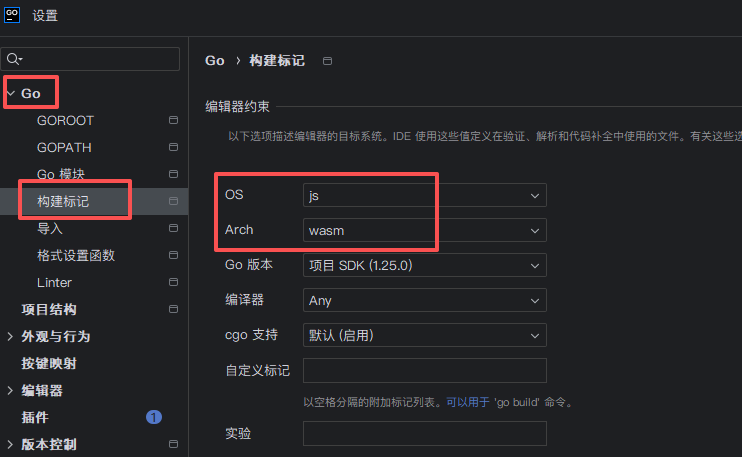
首先改变编绎目标
go env -w GOOS=js GOARCH=wasm(如果用的是goland)再到IDE中修改配置
简易代码
由于syscall/js是实验性的,所以需要在第一行加上//go:build js && wasm
//go:build js && wasm

package main

import (
	"syscall/js"
)

func main() {
	window := js.Global()
	window.Set("goAdd", js.FuncOf(func(this js.Value, args []js.Value) interface{} {
		return args[0].Int() + args[1].Int()
	}))
	select {}
}
编绎
go build -o main.wasm main.go得到wasm文件
运行编绎的wasm
所需的胶水层(wasm_exec.js)文件在:$GOROOT$/lib/wasm
将编绎的wasm文件和wasm_exec.js拷贝到一个目录中
浏览器中运行
新建一个html文件写如下代码(和wasm文件、wasm_exec.js放在一起)
<!DOCTYPE html>
<html lang="en">
<head>
    <meta charset="UTF-8">
    <meta name="viewport" content="width=device-width, initial-scale=1.0">
    <title>Document</title>
    <script src="./wasm_exec.js"></script>
</head>
<body>

</body>
<script>
    var go = new Go();
    WebAssembly.instantiateStreaming(fetch('./main.wasm'), go.importObject).then(obj => {
        console.log(obj.instance.exports);
        go.run(obj.instance);

        //从这里开始就可以调用wasm导出的函数了,例如在简易代码中的goAdd函数
        console.log(goAdd(10,20));
    });
</script>
</html>
NodeJS中运行
新建一个js文件写如下代码(和wasm文件、wasm_exec.js放在一起)
// Copyright 2021 The Go Authors. All rights reserved.
// Use of this source code is governed by a BSD-style
// license that can be found in the LICENSE file.

"use strict";

globalThis.require = require;
globalThis.fs = require("fs");
globalThis.path = require("path");
globalThis.TextEncoder = require("util").TextEncoder;
globalThis.TextDecoder = require("util").TextDecoder;

globalThis.performance ??= require("performance");

globalThis.crypto ??= require("crypto");

require("./wasm_exec");

const go = new Go();

// go.argv = process.argv.slice(2);
// go.env = Object.assign({ TMPDIR: require("os").tmpdir() }, process.env);
go.exit = process.exit;
var bytes = fs.readFileSync(path.join("main.wasm"))

WebAssembly.instantiate(bytes, go.importObject).then((result) => {
	process.on("exit", (code) => { // Node.js exits if no event handler is pending
		if (code === 0 && !go.exited) {
			// deadlock, make Go print error and stack traces
			go._pendingEvent = { id: 0 };
			go._resume();
		}
	});
    go.run(result.instance);

    console.log(goAdd(10,20));

}).catch((err) => {
	console.error(err,11);
	process.exit(1);
});

console.log(typeof sign);
运行第三方网站平台的wasm
拿一个别人网站来示例,用的是golang编绎的,网址:aHR0cHM6Ly93d3cud2FpbWFveGlhLm5ldC8=
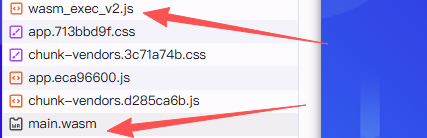
网页加载时会有这二个文件,下载到本地。(最好用第三方平台提供的wasm_exec,如果用golang的lib目录下的可能有问题)
(在go.run之后所有wasm编绎时指定开放的函数都会成为全局函数,在window或globalThis下)
在浏览器中运行
新建一个html文件,写入如下代码,将main.wasm和wasm_exec_v2.js放到与html相同位置
<!DOCTYPE html>
<html lang="en">
<head>
    <meta charset="UTF-8">
    <meta name="viewport" content="width=device-width, initial-scale=1.0">
    <title>Document</title>
    <script src="./wasm_exec_v2.js"></script>
</head>
<body>

</body>
<script>
    var go = new Go();
    WebAssembly.instantiateStreaming(fetch('./main.wasm'), go.importObject).then(obj => {
        console.log(obj.instance.exports);
        go.run(obj.instance);

        //从这里开始就可以调用wasm导出的函数了,例如该网站中的sign()
        console.log(sign("11","22","33","","",""));
    });
</script>
</html>
Node.JS中运行
// Copyright 2021 The Go Authors. All rights reserved.
// Use of this source code is governed by a BSD-style
// license that can be found in the LICENSE file.

"use strict";

globalThis.require = require;
globalThis.fs = require("fs");
globalThis.path = require("path");
globalThis.TextEncoder = require("util").TextEncoder;
globalThis.TextDecoder = require("util").TextDecoder;

globalThis.performance ??= require("performance");

globalThis.crypto ??= require("crypto");

require("./wasm_exec_v2");

const go = new Go();
go.exit = process.exit;
var bytes = fs.readFileSync(path.join("main.wasm"))

WebAssembly.instantiate(bytes, go.importObject).then((result) => {
	process.on("exit", (code) => {
		if (code === 0 && !go.exited) {
			go._pendingEvent = { id: 0 };
			go._resume();
		}
	});
    go.run(result.instance);

    console.log(sign("11","22","33","","","")); //调用方法

}).catch((err) => {
	console.error(err,11);
	process.exit(1);
});
附言
每个由golang定义的函数在前端导航过去都长这样
function () {
	const event = { id: id, this: this, args: arguments };
	go._pendingEvent = event;
	go._resume();
	return event.result;
};